
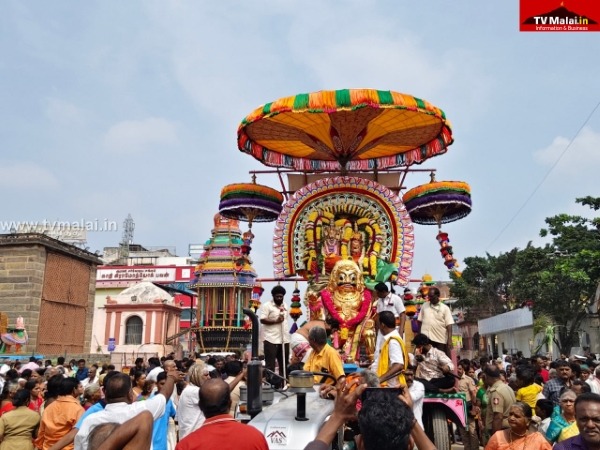
திருவண்ணாமலை அண்ணாமலையார் திருக்கோயிலில் திருக்கார்த்திகை தீபத் திருவிழா மூன்றாம் நாளான இன்று (26.11.2025) காலை விநாயகர், சந்திரசேகரர் பூத வாகனத்தில் பஞ்ச மூர்த்திகள் மாட வீதி உலா நடைபெற்றது.
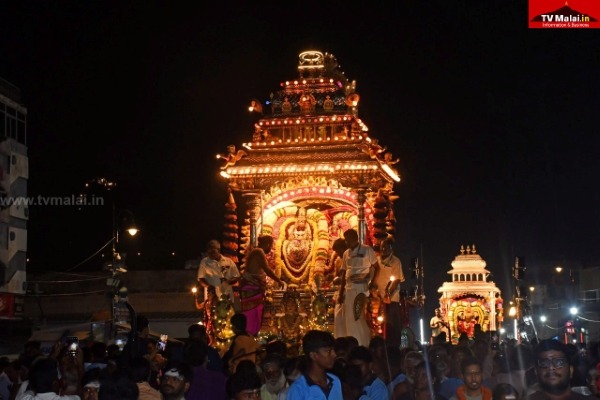
திருவண்ணாமலை அருள்மிகு அண்ணாமலையார் திருக்கோயிலில் கார்த்திகை தீபத் திருவிழா 2025 – இரண்டாம் நாள் இரவு!
திருவண்ணாமலை அண்ணாமலையார் திருக்கோயிலில் திருக்கார்த்திகை தீபத் திருவிழா இரண்டாம் நாளான நேற்று (25.11.2025) இரவு வெள்ளி இந்திர வாகனத்தில் பஞ்ச மூர்த்திகள் மாட வீதி வலம் வந்து பக்தர்களுக்கு அருள்பாலித்தார்.
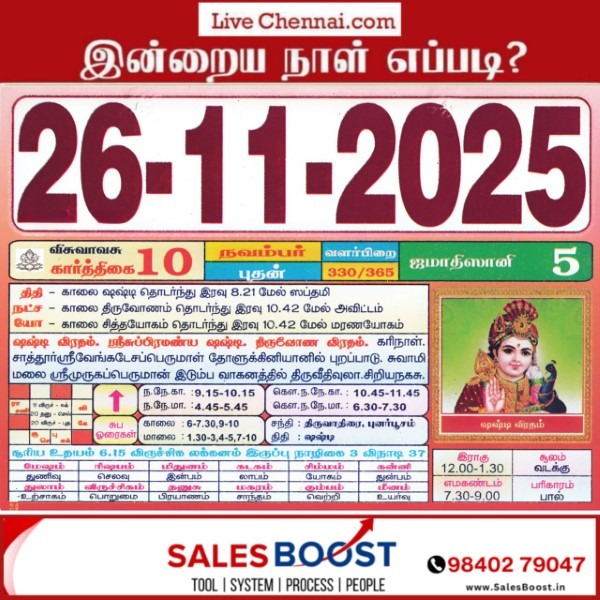
Auspicious (Nalla Neram) time today (Nov 26th)
November 26, 2025 – Wednesday | Karthigai 10 | Visuvavasu Year Auspicious Timings Morning 9:15 AM – 10:15 AM Evening 4:45 PM – 5:45 PM Shubh Hora Timings Morning 6-7-30,09-10 AM Evening 01.30-3, 4-5,7-10 PM Inauspicious Timings Emakandam 07:30AM – 09:00 AM Gulikai 10:30 AM – 12:00 PM Rahu 12:00 PM – 01:30 PM Astrological Details Thithi Shashti Nakshatram Thiruvonam Chandrashtamam Tiruvadhirai Sulam North Remedy Milk
How to Pay Water and Sewerage Tax Online Easily!!
Service Code: CMW-501 | Department: Chennai Metro Water Supply & Sewerage Board Purpose: The Water and Sewerage Tax Payment service enables consumers to pay their outstanding water and sewerage taxes through the e-District portal. This service is designed for: – Residential consumers with water connections in Chennai – Commercial establishments with metro water services – Property owners liable for water and sewerage charges – Authorized representatives handling utility payments Required Information: Mandatory Search Criteria: – CMC Number (either New CMC No. or Old CMC No.) Special Requirements: – Existing Connection: Must have an active water connection with Chennai Metro Water – Demand History: System displays period-wise outstanding demands – Selective Payment: Can choose specific periods to pay or pay all demands – Surcharge Calculation: Includes applicable surcharges on overdue amounts – Operator Login: Service accessed through authorized operator login Step-by-Step Payment Process: 1. Visit the Portal: Login to e-Sevai Tamil Nadu http://tnesevai.tn.gov.in/ portal as Operator 2. Navigate to Service: Click on Services – Chennai Metro Water Supply & Sewerage Board – CMW-501 Water and Sewerage Tax Payment 3. Click Proceed: On the service description page, click Proceed button 4. Enter CMC Number: – Enter either New CMC No. or Old CMC No. (Mandatory) – Click Search 5. Verify Consumer Details: System displays: – Customer Name and Address – Annual Value of the property – Counter Details (Number, Class, Category) – Demand Period List with year-wise breakdown 6. Review Demand Details: For each period, system shows: – Surcharge Effective From date – Surcharge Percentage applied – Surcharge Amount – Demand Amount (base tax) – Demand Total (including surcharge) 7. Select Payments: – Check the boxes for specific periods you want to pay – Or use selection options (All, Tax, Charges) – System calculates Total Amount Payable 8. Make Payment: Click Make Payment button 9. Download Receipt: After successful payment: – Click Get Receipt to download payment receipt – Save/print the receipt for your records Alternative CSC Centre Method: Consumers may also pay water taxes through any Common Service Centre (CSC) where trained operators assist with: – CMC number verification – Demand details explanation – Period selection guidance – Payment processing – Receipt download and printing After Payment: – Instant Receipt: Payment receipt available immediately – Digital Record: Payment recorded in metro water database – Proof of Payment: Downloadable receipt serves as payment proof – No Physical Visit: Entire process completed online Important Notes: – Mandatory Field: CMC Number (either new or old) is required for search – Demand Selection: Can pay selected periods or all outstanding demands – Surcharge Application: Overdue amounts include surcharges (up to 80% as per examples) – Receipt Details: Includes consumer information, payment breakdown, and transaction details – Payment Flexibility: Can choose to pay partial demands by selecting specific periods – Chennai Metro Water: Service limited to Chennai Metro Water consumers – Existing Connection Required: Only for registered water connections – Demand Periods: Shows historical demands with applicable surcharges Assistance: Visit your nearest e-Sevai / CSC Centre This guide is based on the Chennai Metro Water Supply & Sewerage Board User Manual. Government of Tamil Nadu, 2016.

How to Pay Property Tax Online Easily!!
Service Code: COC-603 | Department: Greater Chennai Corporation Purpose: The Collection of Property Tax service enables property owners to pay their outstanding property tax through the e-District portal. This service is designed for: – Property owners within Chennai Corporation limits – Authorized representatives handling property tax payments – Residential and commercial property owners – Owners of both new and old property registrations Required Information: Mandatory Search Criteria (Choose One Option): For New Property: – Property Type: Select “New” – Zone Number where property is located – Division Code of the property area – Bill Number of the property – Sub Number of the property For Old Property: – Property Type: Select “Old” – Old Property Tax Number – Local Body selection Special Requirements: – Existing Property: Must be previously assessed for property tax – Tax Assessment: System displays half-yearly arrears automatically – Penalty Inclusion: May include penalty amounts for overdue payments – Payment Flexibility: Can pay partial or full outstanding tax amount – Operator Login: Service accessed through authorized operator login Step-by-Step Payment Process: 1. Visit the Portal: Login to e-Sevai Tamil Nadu portal as Operator 2. Navigate to Service: Click on Services → Greater Chennai Corporation → COC-603 Collection of Property Tax 3. Select Property Type and Enter Details: – Select Property Type (New or Old – Mandatory) For New Property: – Select Zone No. (Mandatory) – Select Division Code (Mandatory) – Enter Bill No. (Mandatory) – Enter Sub No. (Mandatory) For Old Property: – Enter Old Property Tax Number (Mandatory) – Select Local Body (Mandatory) – Click Search 4. Review Tax Information: System displays: – Owner Name and Address – Half-Yearly Wise Arrears breakdown (shows 6-month periods) – Penalty amounts (if applicable) – Total Collection Amount (already paid) – Total Demand Amount (total tax due) – Total Payable Amount (outstanding balance) 5. Make Payment: – Enter Amount To Be Paid (can be partial or full amount) – Click Make Payment 6. Download Receipt: After successful payment: – Click Get Receipt to download payment receipt – Save/print the receipt for tax records Alternative CSC Centre Method: Property owners may also pay taxes through any Common Service Centre (CSC) where trained operators assist with: – Property type selection and details verification – Tax arrears calculation and explanation – Penalty amount clarification – Payment processing – Receipt download and printing After Payment: – Instant Receipt: Payment receipt available immediately – Digital Record: Tax payment recorded in corporation database – Proof of Payment: Downloadable receipt serves as payment proof – No Physical Visit: Entire process completed online Important Notes: – Property Type Selection: Must choose correct property type (New/Old) first – Different Requirements: New and Old properties have different search criteria – Arrears Display: System shows half-yearly arrears history automatically – Penalty Charges: May include separate penalty amounts for overdue payments – Flexible Payment: Can pay any amount towards outstanding tax arrears – Receipt: Payment receipt is generated instantly after transaction – Tax Compliance: Payment updates property tax compliance status – Greater Chennai Corporation: Service limited to Chennai Corporation jurisdiction – Existing Assessment Required: Only for previously assessed properties – Half-Yearly System: Tax periods displayed as half-yearly cycles (e.g., 2015_2016_1, 2015_2016_2) Apply Online: https://tnedistrict.tn.gov.in Assistance: Visit your nearest e-Sevai / CSC Centre This guide is based on the Tamil Nadu e-District User Manual (COC-603). Government of Tamil Nadu, 2016.
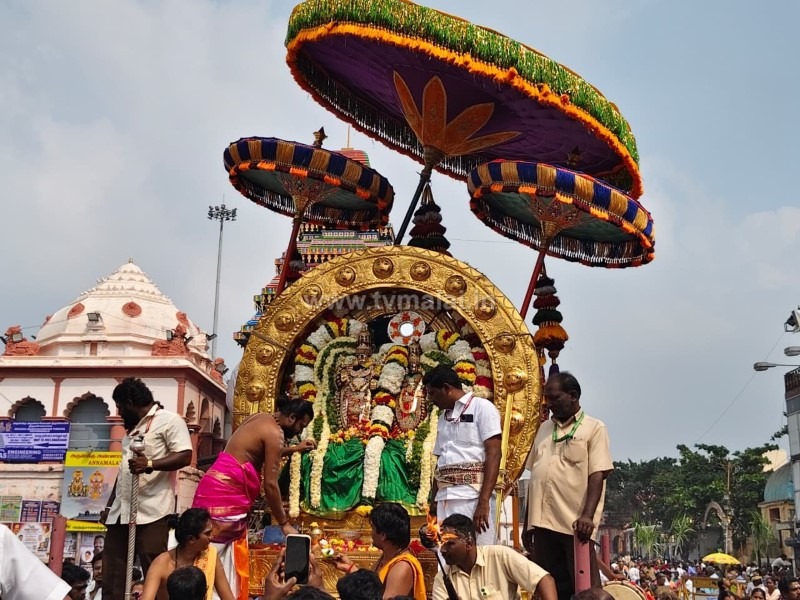
திருவண்ணாமலை அருள்மிகு அண்ணாமலையார் திருக்கோயிலில் கார்த்திகை தீபத் திருவிழா 2025 – இரண்டாம் நாள் காலை!
திருவண்ணாமலை அண்ணாமலையார் திருக்கோயிலில் திருக்கார்த்திகை தீபத் திருவிழா இரண்டாம் நாளான இன்று (25.11.2025) காலை அருள்மிகு சந்திரசேகரர் சூரிய பிரபை வாகனத்திலும் விநாயகர் மூஷிக வாகனத்திலும் மாட வீதி வலம் வந்து பக்தர்களுக்கு அருள்பாலித்தார்.
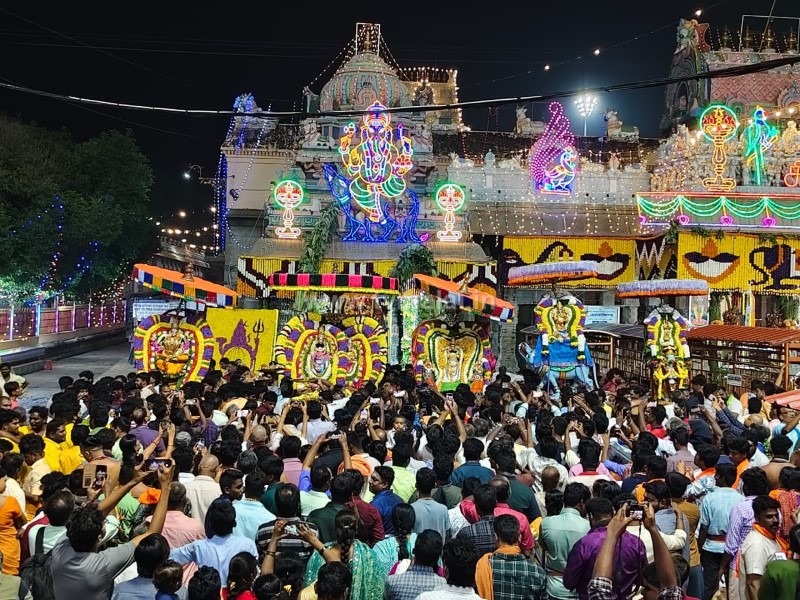
திருவண்ணாமலை கார்த்திகை தீபத் திருவிழா 2025 – முதல் நாள் இரவு..!
திருவண்ணாமலை அருள்மிகு அருணாசலேஸ்வரர் திருக்கோவில் திருக்கார்த்திகை தீபத் திருவிழா முதல் நாளான நேற்று (24.11.2025) விநாயகர்- மூஷிக வாகனத்திலும், சுப்பிரமணியர்- மயில் வாகனத்திலும், அண்ணாமலையார் – வெள்ளி அதிகார நந்தி வாகனத்திலும், அம்மன் – வெள்ளி அன்ன வாகனத்திலும், சண்டிகேஸ்வரர்- அதிகார நந்தி வாகனத்திலும் எழுந்தருளி மாட வீதி உலா வந்து பக்தர்களுக்கு அருள்பாலித்தார்.
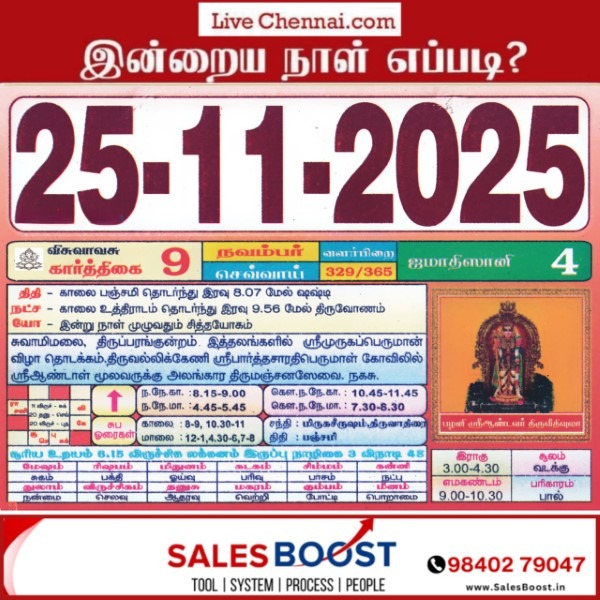
Auspicious (Nalla Neram) time today (Nov 25th)
November 25, 2025 – Tuesday | Karthigai 09 | Visuvavasu Year Auspicious Timings Morning 8:15 AM – 9:00 AM Evening 4:45 PM – 5:45 PM Shubh Hora Timings Morning 8-9,10.30-11 AM Evening 12-1, 4.30-6,7-8 PM Inauspicious Timings Emakandam 09:00 AM – 10:30 AM Gulikai 12:00 PM – 01:30 PM Rahu 03:00 PM – 04:30 PM Astrological Details Thithi Panchami Nakshatram Uttara Ashadha Chandrashtamam Mrigashira Sulam North Remedy Milk
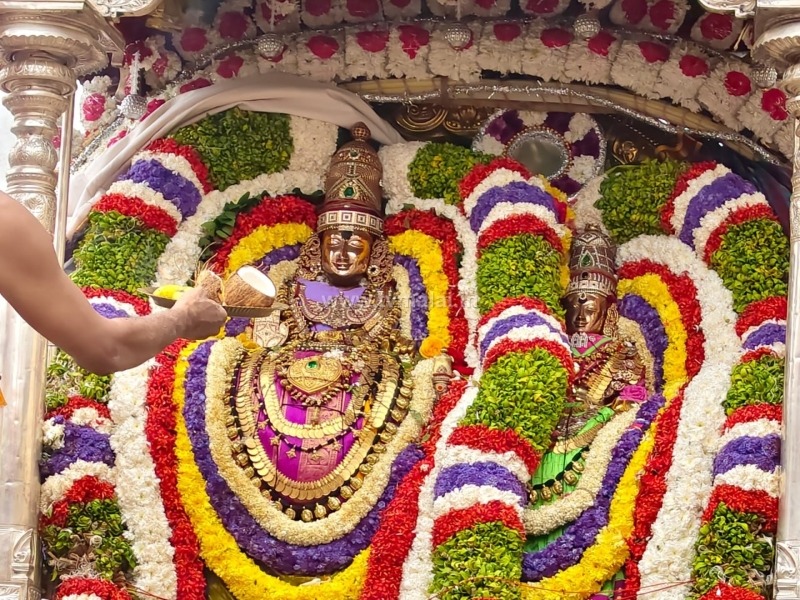
திருக்கார்த்திகை தீபத் திருவிழா முதல் நாள் காலை!
திருவண்ணாமலை அருள்மிகு அண்ணாமலையார் திருக்கோவிலில் திருக்கார்த்திகை தீபத் திருவிழா 2025 (24.11.2025) இன்று கொடியேற்றத்துடன் தொடங்கியது. பஞ்சமூர்த்திகள் வெள்ளி விமானங்களில் வீதியுலா வந்து பக்தர்களுக்கு அருள் பாலித்தனர். இதில் திரளான பக்தர்கள் கலந்து கொண்டு சாமி தரிசனம் செய்தனர்.

விநாயகர் மற்றும் சண்டிகேஸ்வரருக்கு சிறப்பு அபிஷேகம்!
கார்த்திகை தீபத்தை முன்னிட்டு, விநாயகருக்கும் சண்டிகேஸ்வரருக்கும் நேற்று சிறப்பு அபிஷேகம் நடைபெற்றது. பின்னர், இருவரும் சிறப்பு அலங்காரத்தில் எழுந்தருளி பக்தர்களுக்கு அருள் பாலித்தனர்.

How to Pay Professional Tax Online Easily!!
Service Code: COC-602 | Department: Greater Chennai Corporation Purpose: The Collection of Professional Tax service enables professionals and businesses to pay their outstanding professional tax through the e-District portal. This service is designed for: – Professionals and business entities liable for professional tax – Employers responsible for deducting and remitting professional tax – Authorized representatives handling tax compliance – Entities registered within Greater Chennai Corporation limits Required Information: Mandatory Search Criteria: – Zone Number where professional/business is registered – Division Code of the business location – Category of the professional/business – Unique ID of the professional/business Special Requirements: – Existing Registration: Must be previously registered for professional tax – Tax Assessment: System displays half-yearly arrears automatically – Category Selection: Must select appropriate professional/business category – Payment Flexibility: Can pay partial or full outstanding tax amount – Operator Login: Service accessed through authorized operator login Step-by-Step Payment Process: 1. Visit the Portal: Login to e-Sevai Tamil Nadu https://tnedistrict.tn.gov.in portal as Operator 2. Navigate to Service: Click on Services – Greater Chennai Corporation – COC-602 Collection of Professional Tax 3. Enter Professional Details: – Select Zone No. (Mandatory) – Select Division Code (Mandatory) – Select Category (Mandatory) – Enter Unique Id (Mandatory) – Click Search 4. Review Tax Information: System displays: – Company/Professional Name and Address – Half-Yearly Wise Arrears breakdown (shows 6-month periods) – Total Collection Amount (already paid) – Total Demand Amount (total tax due) – Total Payable Amount (outstanding balance) 5. Make Payment: – Enter Amount To Be Paid (can be partial or full amount) – Click Make Payment 6. Download Receipt: After successful payment: – Click Get Receipt to download payment receipt – Save/print the receipt for tax records Alternative CSC Centre Method: Professionals may also pay taxes through any Common Service Centre (CSC) where trained operators assist with: – Professional details verification – Tax arrears calculation and explanation – Category selection guidance – Payment processing – Receipt download and printing After Payment: – Instant Receipt: Payment receipt available immediately – Digital Record: Tax payment recorded in corporation database – Proof of Paymyment: Downloadable receipt serves as payment proof – No Physical Visit: Entire process completed online Important Notes: – Mandatory Fields: Zone No., Division Code, Category, and Unique Id are all required for search – Category Selection: Must choose correct professional/business category – Arrears Display: System shows half-yearly arrears history automatically – Flexible Payment: Can pay any amount towards outstanding tax arrears – Receipt: Payment receipt is generated instantly after transaction – Tax Compliance: Payment updates professional tax compliance status – Greater Chennai Corporation: Service limited to Chennai Corporation jurisdiction – Existing Registration Required: Only for previously registered professionals/businesses – Half-Yearly System: Tax periods displayed as half-yearly cycles (e.g., 2014_2015_2, 2015_2016_1) Apply Online: https://tnedistrict.tn.gov.in Assistance: Visit your nearest e-Sevai / CSC Centre This guide is based on the Tamil Nadu e-District User Manual (COC-602). Government of Tamil Nadu, 2016.
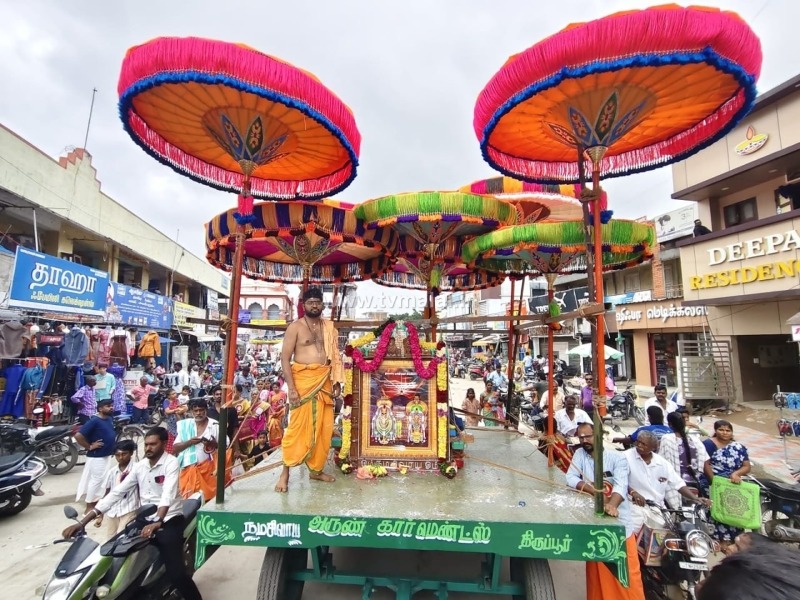
திருவண்ணாமலை தீபத் திருவிழாவில் பல்லாவரம் அருணாச்சலா சேவா அறக்கட்டளையின் திருக்குடை உபய நிகழ்வு!
திருவண்ணாமலை தீபத்திருவிழாவை முன்னிட்டு, பல்லாவரம் அருணாச்சலா சேவா அறக்கட்டளை வழங்கிய பஞ்சமூர்த்திகளுக்கான திருக்குடைகள் உபய நிகழ்வு நேற்று (23.11.2025) ஞாயிற்றுக்கிழமை சிறப்பாக நடைபெற்றது.
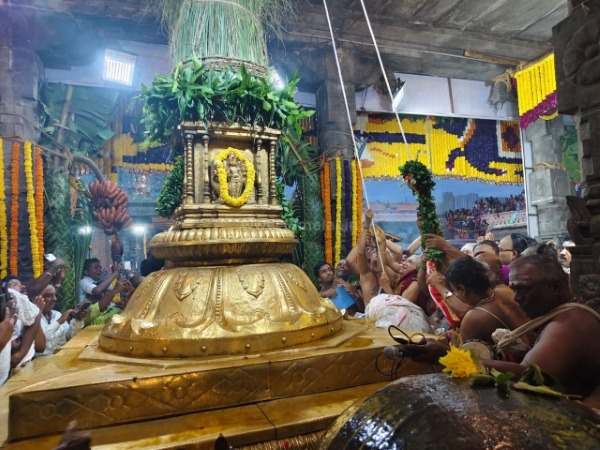
அருள்மிகு அருணாசலேஸ்வரர் கோயிலில் திருக்கார்த்திகை தீபத்திருவிழா: கொடியேற்றத்துடன் இன்று தொடக்கம்!
திருக்கார்த்திகை தீப திருவிழா – 2025 திருவண்ணாமலை அண்ணாமலையார் திருக்கோவிலில் திருக்கார்த்திகை தீப திருவிழாவை முன்னிட்டு 64 அடி உயர தங்க கொடி மரத்தில் கொடியேற்றத்துடன் கோலாகலமாக இன்று (24.11.2025) தொடங்கியது. பின் வெள்ளி இந்திர விமானத்தில் பஞ்சமூர்த்திகள் மாட வீதி உலா நடைபெற்று வருகிறது. இதில் பல்லாயிரக்கணக்கான பக்தர்கள் கலந்து கொண்டு சாமி தரிசனம் செய்தனர். இதில் 10 நாட்களும் திருவிழா நடைபெறும். பத்தாம் நாளான புதன்கிழமை (03.12.2025) அன்று அதிகாலை 04:00 மணிக்கு பரணி தீபமும், அன்று மாலை 06:00 மணியளவில் 2,668 அடி உயரம் உள்ள அண்ணாமலை உச்சியில் மகா தீபம் ஏற்றப்பட உள்ளது.
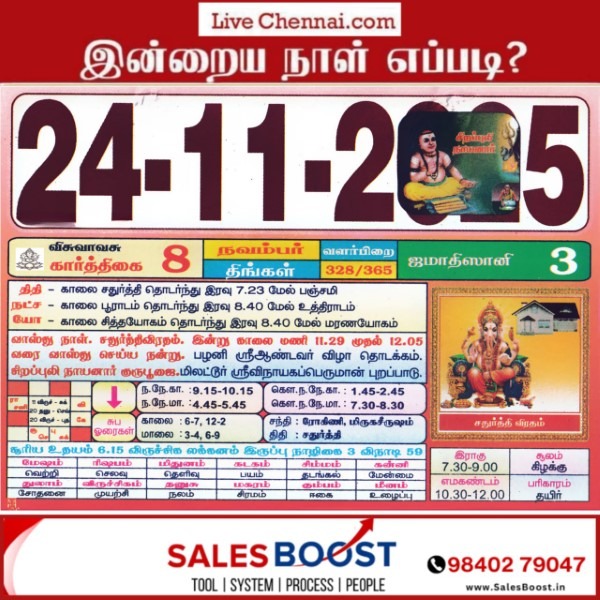
Auspicious (Nalla Neram) time today (Nov 24th)
November 24, 2025 – Monday | Karthigai 08 | Visuvavasu Year Auspicious Timings Morning 9:15 AM – 10:15 AM Evening 4:45 PM – 5:45 PM Shubh Hora Timings Morning 6-7,12-2 PM Evening 3-4, 6-9 PM Inauspicious Timings Emakandam 10:30 AM – 12:00 PM Gulikai 01:30 PM – 03:00 PM Rahu 07:30 AM – 09.00 AM Astrological Details Thithi Chaturthi Nakshatram Pooraadam Chandrashtamam Rohini Sulam East Remedy Curd
How to Pay Non-Tax Dues Online Easily!!
Service Code: CMA-601 | Department: Commissionerate of Municipal Administration Purpose: The Collection of Non Tax service enables property owners to pay their outstanding non-tax dues to municipal administrations through the e-District portal. This service is designed for: – Property owners in municipal areas outside Chennai Corporation – Business establishments with municipal non-tax obligations – Authorized representatives handling municipal payments – Residents of various municipal administrations across Tamil Nadu Required Information: Mandatory Search Criteria: – ULB Code (Urban Local Body Code) – Allotment Number (either New Allotment No. or Old Allotment No.) Special Requirements: – Existing Property: Must have a registered property with municipal administration – DCB Details: System displays month-wise and year-wise outstanding demands – Cumulative Balance: Shows running total of all outstanding amounts – Payment Flexibility: Can pay any amount towards total dues – Multiple ULBs: Service covers various municipal administrations across Tamil Nadu Step-by-Step Payment Process: 1. Visit the Portal: Login to e-Sevai Tamil Nadu http://tnesevai.tn.gov.in/ portal as Operator 2. Navigate to Service: Click on Services – Commissionerate of Municipal Administration – CMA-601 Collection of Non Tax 3. Click Proceed: On the service description page, click Proceed button 4. Enter Property Details: – Select ULB Code (Mandatory – selects specific municipality) – Enter either New Allotment No. or Old Allotment No. (Mandatory) – Click Search 5. Verify Property Details: System displays: – Owner Name and Address – Property Type (e.g., Building) – Property Number and Ward Number – ULB/Municipality Name 6. Review DCB Details: System shows detailed breakdown: – Period-wise demands (monthly and yearly) – Service Tax amounts – Tax Demand Amount (original due) – Tax Collected Amount (already paid) – Total Balance Amount (outstanding per period) – Cumulative Balance Amount (running total) 7. Make Payment: – Enter Amount To Be Paid (can be partial or full amount) – Click Make Payment 8. Download Receipt: After successful payment: – Click Get Receipt to download payment receipt – Save/print the receipt for your records Alternative CSC Centre Method: Property owners may also pay non-tax dues through any Common Service Centre (CSC) where trained operators assist with: – ULB code and allotment number verification />- DCB details explanation – Payment amount calculation – Payment processing – Receipt download and printing After Payment: – Instant Receipt: Payment receipt available immediately – Digital Record: Payment recorded in municipal database – Proof of Payment: Downloadable receipt serves as payment proof – No Physical Visit: Entire process completed online Important Notes: – Mandatory Fields: ULB Code and Allotment Number are both required for search – Multiple Municipalities: Service covers various ULBs across Tamil Nadu (not just Chennai) – Detailed Breakdown: System shows period-wise DCB details with cumulative totals – Flexible Payment: Can pay any amount towards total outstanding balance – Receipt Details: Includes property information, payment breakdown, and transaction details – Property Types: Covers various property types including buildings, commercial establishments, etc. – Historical Data: Shows demands from previous years with complete payment history – Commissionerate of Municipal Administration: Service covers multiple municipal administrations across the state Apply Online: http://tnesevai.tn.gov.in/ Assistance: Visit your nearest e-Sevai / CSC Centre This guide is based on the Commissionerate of Municipal Administration User Manual. Government of Tamil Nadu, 2016.

Auspicious (Nalla Neram) time today (Nov 23rd)
November 23, 2025 – Sunday | Karthigai 07 | Visuvavasu Year Auspicious Timings Morning 7:45 AM – 8:45 AM Evening 3:15 PM – 4:15 PM Shubh Hora Timings Morning 7-10,11-12 PM Evening 2-4.30, 6-7, 9-12 PM Inauspicious Timings Emakandam 12:00 PM – 01:30 PM Gulikai 03:00 PM – 04:30 PM Rahu 04:30 PM – 06:00 PM Astrological Details Thithi Thrithiya Nakshatram Mulam Chandrashtamam Karthikai Sulam West Remedy Jaggery

Gold Rate Today (22 November 2025): Price Rises by Rs 1,360 per Sovereign in Chennai
The price of gold increased by ₹170 per gram and ₹1,360 per sovereign today. Gold Price Today – 22 November 2025 22K Gold – ₹11,630 per gram – ₹93,040 per sovereign (8 grams) 24K Pure Gold (999 / 24 Carat) – ₹12,687 per gram Silver Price Today – ₹172 per gram – ₹1,72,000 per kilogram Gold and silver prices have been fluctuating due to global market trends, currency movements, and investment demand.

Why Does Our Immunity Drop During Seasonal Changes? How to Stay Protected
When the weather shifts suddenly, many people begin to experience issues like cold, cough, fever, sore throat, or fatigue. One major reason is that seasonal changes can put extra stress on the immune system, making the body more vulnerable to infections. 1. Rapid Weather Fluctuations Quick changes in temperature can disturb the body’s internal balance. This may weaken immune response and increase the risk of viral and bacterial infections. 2. Extra Energy Demand on the Body When temperatures rise or fall, the body works harder to maintain its normal warmth. This can drain energy and place more pressure on the immune system. 3. Increase in Allergens and Germs During shifting seasons, elements like dust, pollen, viruses, and fungi become more active in the air. These can stress the immune system, making it harder for the body to defend itself. 4. Cold Air Weakens Protective Barriers Cooler weather may affect the nose, throat, skin, and lungs, reducing their ability to block germs. Even a small drop in body temperature can negatively impact immunity. 5. Disturbed Routine and Stress Seasonal changes often disrupt sleep patterns and daily habits. Lack of rest and increased stress can alter hormone levels, further lowering immune strength. How to Stay Protected – Eat nutritious foods, especially fruits and vegetables rich in vitamin C like lemon, amla, and other citrus fruits. – Stay hydrated, particularly in colder months. – Exercise 30–60 minutes daily to support immune function. – Get 7–8 hours of sleep every night. – Manage stress through relaxation or mindful habits. – Consult a doctor instead of self-treatment if you feel unwell. Disclaimer: The information above is shared for general awareness only. It is not a medical diagnosis or treatment plan. For any health concerns, please seek advice from a qualified healthcare professional.
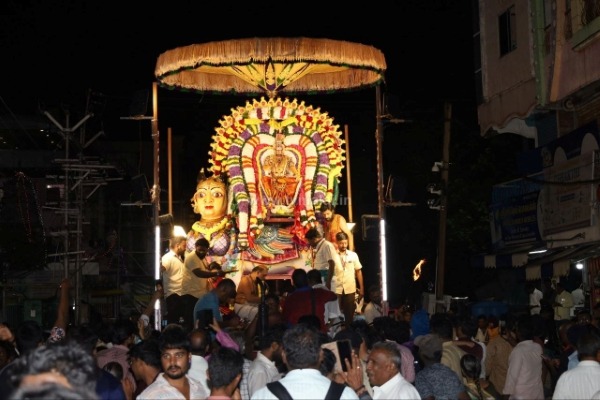
திருவண்ணாமலை தீபத் திருவிழாவை முன்னிட்டு ஸ்ரீ துர்க்கை அம்மன் திருவீதி உலா!
திருவண்ணாமலை அருள்மிகு அண்ணாமலையார் திருக்கோயிலில் திருக்கார்த்திகை தீபத் திருவிழாவை முன்னிட்டு, நேற்று (21.11.2025) இரவு துர்க்கை அம்மன் (ஊர்க்காவல் தெய்வம்) சிறப்பு அபிஷேக ஆராதனை மற்றும் தீபராதனையுடன் மாட வீதி உலா வெகுவிமர்சையாக நடைபெற்றது. இதில் திரளான பக்தர்கள் கலந்து கொண்டு அம்மன் அருள் பெற்றனர்.

2025 திருக்கார்த்திகை தீபத் திருவிழா பத்தாம் நாள் மகாதீபம்!! – அறிந்துகொள்ள வேண்டிய தகவல்கள்
திருவண்ணாமலை அண்ணாமலையார் திருக்கோயிலில் திருக்கார்த்திகை தீபத் திருவிழாவின் முக்கிய நிகழ்வான மகா தீபம் 2,668 அடி உயரமுள்ள அண்ணாமலை மலை உச்சியில் மகா தீபம் ஏற்ற பட உள்ளன. இரவு பஞ்சமூர்த்திகள்- தங்க ரிஷப வாகனத்தில் வீதி உலா நடைபெறும்.
